

The Problem: Frontend Developers Shouldn’t Be a Bottleneck for Small Changes
Last month, one of our backend developers changed the spacing on a dashboard component, adjusted a button’s border radius, and updated a tooltip’s copy - all without opening an IDE, cloning the repo, or asking a frontend developer for help. He wrote a Jira ticket, added a label, and came back twenty minutes later to a Pull Request with a live preview deployed.
This isn’t a hypothetical. It’s a system we built incrementally over a few weeks using GitHub Actions, the Cursor CLI, and a handful of Python scripts. We call it the Coding Agent.
The motivation was simple. At Solid, our frontend team is small. They should be spending their time on architecture, performance, and complex features - not context-switching to nudge a padding value by 4 pixels because someone on the product team noticed it was off. Those changes are real work, but the overhead of the *process* (local setup, find the file, lint, branch, PR) dwarfs the actual edit. We wanted to eliminate that overhead entirely.
Here’s how we built it, one workflow at a time.
Step 1: A Manual Workflow That Proves the Concept
We started simple. Really simple. The first version was a single GitHub Actions workflow with a workflow_dispatch trigger - meaning you had to go to the GitHub Actions UI, click “Run workflow,” and manually type in a Jira issue key and branch name.
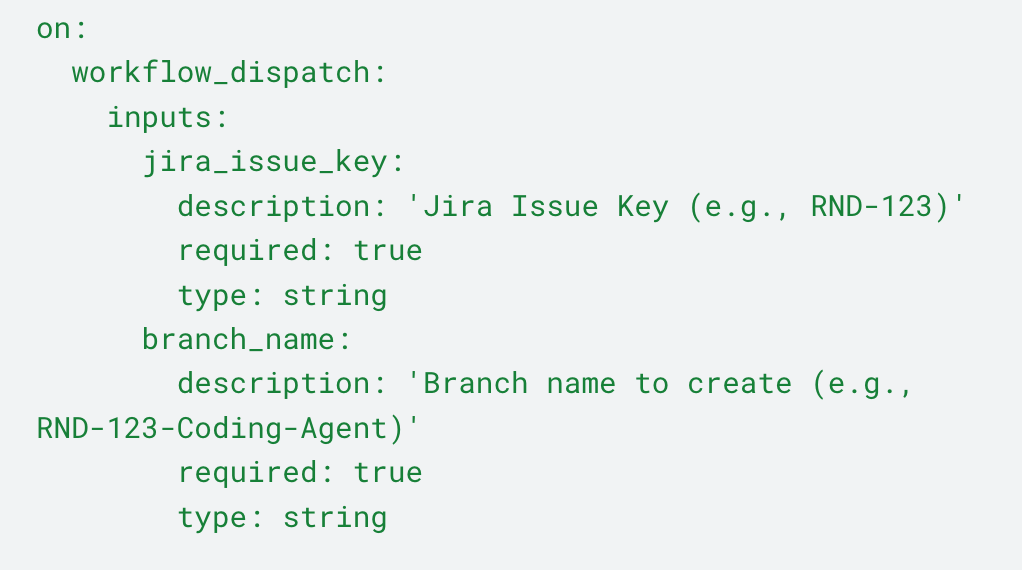
Glamorous? No. But it let us validate the core loop:

Extract the Jira issue. A Python script (extract_jira_issue.py) calls the Jira REST API, pulls down everything - summary, description (parsing Atlassian Document Format into readable text), comments, attachments, metadata - and writes it to a structured directory as both JSON and a human-readable Markdown file.
Feed it to the Cursor agent. We install the Cursor CLI in the runner and invoke it with a prompt that points at the extracted issue info.
The agent has full access to the repository, reads the ticket, figures out which files to change, and makes the edits.
Lint, commit, and push. After the agent finishes, we run our linter to clean up any formatting issues, then commit everything to a new branch and push.
Deploy to a preview environment. We call a reusable workflow that deploys the branch to a temporary frontend deployment named after the Jira ticket (e.g., RND123). This gives each ticket its own isolated preview URL.
Create a Pull Request. The workflow creates a PR titled RND-123 - [Coding Agent] - Fix sidebar spacing, with the Jira ticket link, the issue summary, the agent’s implementation summary, and the deployment URL all in the PR body.
Notify. A Slack message goes out with the status, Jira link, PR link, and deployment URL.
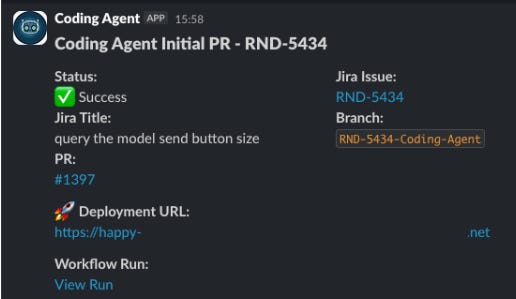
Even this minimal version was immediately useful. A backend developer could go to GitHub Actions, type RND-456, and ten minutes later have a PR with a live preview ready for review. No local environment needed. No frontend developer interrupted.
Step 2: Triggering From Jira With a Label
The manual workflow proved the concept. Now we wanted to meet people where they already work: Jira.
We set up a Jira webhook that fires a GitHub repository_dispatch event whenever the coding_agent label is added to a ticket. The payload is minimal - just the issue key:
On the GitHub side, we created a new entry-point workflow: coding-agent-event-dispatch. This workflow listens for the repository_dispatch event.
Its job is to be the router. It validates the Jira issue key, derives a deterministic branch name ({JIRA_KEY}-Coding-Agent), checks whether that branch already exists on the remote, and then calls the appropriate downstream workflow.
If the branch doesn’t exist, it calls the initial commit workflow to create it. This is the same workflow from Step 1, but now it’s also a reusable workflow_call - it can be triggered both manually and programmatically.
And once the PR is created, a Python script (add_jira_comment.py) posts a comment back on the Jira ticket with a link to the PR. So the person who added the label gets notified right inside Jira that the agent has done its work.
Now the flow became: open Jira ticket, describe the change, add coding_agent label, continue working on meaningful tasks, get notified the flow finished, and come back to a PR with a live preview when you can. No GitHub Actions UI needed. This allowed our product managers and our designers to implement small changes immediately, without knowing how to code.
Step 3: The Fix PR Flow - Making the Agent Iterative
A coding agent that only gets one shot at a change isn’t very useful in practice. The first implementation is often close but needs adjustments. Maybe the agent used the wrong shade of gray. Maybe it changed the right component but missed a second instance.
The traditional workflow would be: reviewer leaves PR comments, frontend developer reads comments, makes fixes. We wanted the agent to handle that loop too.
We built a second reusable workflow: coding-agent-fix-pr. Instead of creating a new branch, this one checks out the existing branch, gathers all the context it needs, and gives the agent a second (or third, or fourth) pass.
The context-gathering step is more sophisticated than the initial flow. The fix workflow:
Downloads previous state from our cloud storage. We persist all the agent’s working files (issue info, plan, summary, handled comments) to our cloud storage between runs. This way the agent doesn’t lose its memory between workflow executions.
Generates a branch diff. It runs a diff check on the branch and saves it to a file. This tells the agent what has already been changed, so it doesn’t redo work.
Fetches PR comments. It pulls both general PR comments and inline code review comments from the GitHub API.
Processes and converts comments to YAML. A Python script normalizes the comments into a clean structure, and another converts them to YAML - a format the agent can parse easily.
Tracks handled comments. A handled_comments.yaml file keeps track of which comment IDs the agent has already addressed, so it doesn’t process the same feedback twice.
After the agent makes its fixes, the workflow commits, deploys the updated preview, and posts a completion comment on the PR:
Coding Agent finished processing PR comments for RND-123. Changes have been committed and pushed to the branch. Deployment URL: https://rnd123.preview.url.com
Step 4: Mentioning @coding_agent in a PR Comment
The label-based trigger works great for the initial flow and for re-triggering from Jira. But once a PR exists, the natural place for feedback is the PR itself. Reviewers are already leaving comments there. Having to go back to Jira to trigger the agent felt like unnecessary friction.
So we added one more entry point: coding-agent-comment-dispatch. This workflow listens to the issue_comment event (which GitHub fires for PR comments too) and checks if the comment body contains @coding_agent.
When someone writes a comment like “@coding_agent please fix the font size on the header - it should be 14px not 16px”, the workflow:
Verifies the PR is open (it won’t process closed or merged PRs)
Extracts the Jira issue key from the branch name (since our branches follow the {JIRA_KEY}-Coding-Agent convention)
Posts a confirmation comment so you’ll know it’s listening
Calls the fix PR workflow
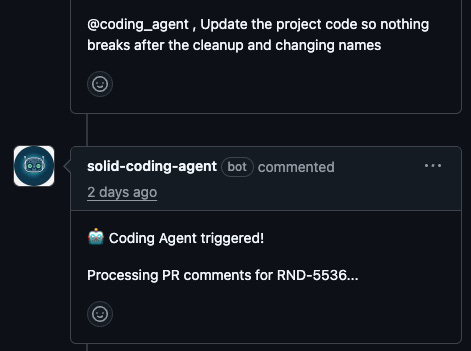
This closed the loop entirely. A reviewer can leave feedback, mention the agent, and walk away. The agent picks up the comments, makes the fixes, pushes a new commit, and deploys. The reviewer comes back to find their requested changes implemented.
What We Learned
Start with workflow_dispatch. Being able to manually trigger the workflow was invaluable during development and remains useful for debugging. Every reusable workflow we built supports both workflow_call (for programmatic triggering) and workflow_dispatch (for manual runs). Don’t remove the manual trigger when you add automation - you’ll need it.
Persist state externally. GitHub Actions runners are ephemeral. We use our cloud storage to persist the agent’s working files between runs. This gives the agent continuity across the initial implementation and subsequent fix passes. Without this, every run would start from zero.
Give the agent context about what’s already done. The branch diff is crucial. Without it, the agent would sometimes redo changes that were already implemented, creating confusing diffs. Telling it “here’s what you’ve already changed, don’t redo this” dramatically improved the quality of iterative fixes.
Meet people where they are. The Jira label trigger was the single biggest adoption driver. Backend developers and product managers were already in Jira all day. Making the agent accessible from there - rather than requiring them to navigate GitHub Actions - was the difference between “cool demo” and “tool people actually use.”
Know what it’s bad at. The agent handles well-scoped, single-concern changes reliably: fix this color, adjust this spacing, update this label. It struggles with anything that requires understanding cross-component relationships or making judgment calls about UX. We learned quickly to write tickets that are specific and visual - “change the header font size from 16px to 14px” works; “make the header look better” doesn’t. The quality of the output is a direct function of the quality of the ticket.
Conclusion
While the current flow works, and more importantly, it’s in use, there are a few improvements we would like to add. For example having an agent take screenshots of the change implemented (or clip when needed) and put them automatically on the Jira ticket. This will allow our product managers to close the check loop immediately on Jira. We’ll also want to allow them to ask for changes from Jira and not through Github.
The thing that surprised us most wasn’t the technology. It was the behavioral shift. Before the agent, small UI issues would sit in the backlog for weeks - not because they were hard, but because no one wanted to interrupt a frontend developer for something trivial. Now those tickets get resolved the same day they’re filed, often by the person who noticed the problem in the first place. The backlog didn’t just shrink. An entire category of work stopped accumulating. Of course we will need to validate this with actual metrics like time-to-merge, but the overall response from our teams was very positive.
You can find the full workflows, code, and explanation on our public repository. This will not work “out of the box”, but all the relevant building blocks are there which should be a great starting point to implement your own solution.
